
Before installing any deepfake scanner app on iOS or Android, slow down for one measurement the app stores never show: how much media the tool behind the icon can actually scan. A scanner that only reads faces will wave through a fully synthetic scene, and the download page will not warn you.
Coverage breadth across 60 tools
Our database records the media types each of 60 detection tools supports: image, video, audio, and text. Counted by breadth, 12 tools cover exactly one media type, 15 cover two, 26 cover three, and just 7 cover all four. The typical scanner is a three-medium tool, and the all-rounders are rare enough to name-check before you trust one with everything.
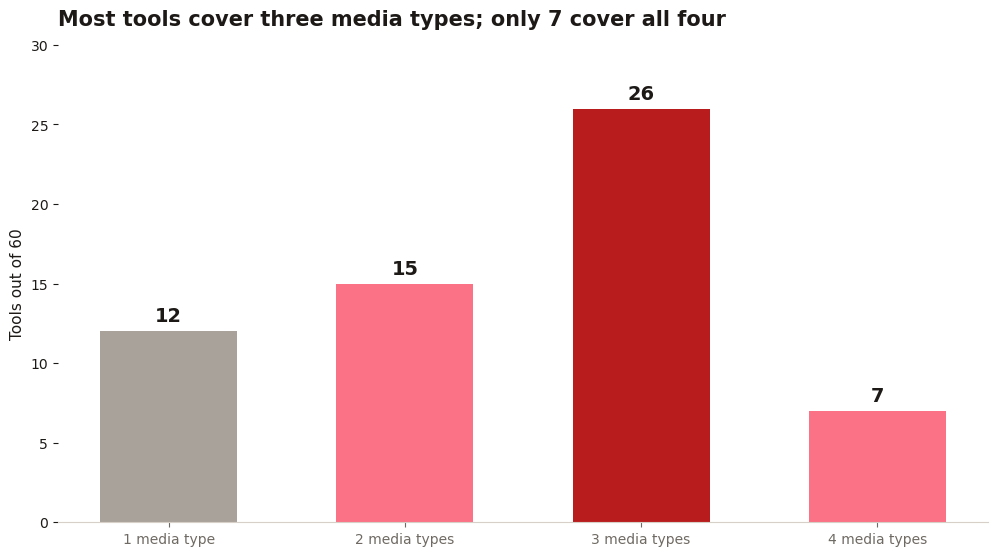
The single-medium tools are not automatically bad. A dedicated audio checker can be the right download if your problem is voice notes and call scams. The failure mode is mismatch: someone downloads a face-only photo scanner, points it at a suspicious video, gets a clean verdict, and stops asking questions. Match the scanner to the media you actually receive, which for most people is photos first and short video clips second.
Price tells a similar story. 22 of the 60 tools record a basic tier, so a paid download has to justify itself with breadth, speed, or a benchmark. Only 25 of the 60 state any benchmark at all, which is the number to ask about before funds changes hands.
The five checks before you download
1. What it actually analyzes. Faces only? Full frames? Audio? A "video checker" that only looks at faces misses full-synthetic scenes.
2. Where your files go. Uploads to a vendor server are fine for public content, unacceptable for private media. Read the retention policy.
3. The price model. with limits is honest. "unlimited 100% accurate" is a lie.

4. Evidence for accuracy claims. Public benchmark results beat marketing percentages. Ask which test set.
5. What the verdict includes. A score with no explanation teaches you nothing. Explanations teach you what to look at next time.
Sources: CISA
Red flags: no company name, no methodology, requests for contacts or photo library access it does not need. Detection apps do not need your contacts.
Permissions are the second scan
Read the permission list the way you read the coverage chart. A scanner needs your files or your camera roll for the media you hand it, and nothing else. It does not need contacts, location, call logs, or your microphone while it sits in the background. On both iOS and Android, grant photo access per item where the system offers it, and revoke anything the app cannot explain in one sentence. The stores are full of scanners that scan nothing, and their business model is usually the permissions, not the detection.
Updates are the other quiet test. Generators change monthly, and a scanner that has not updated its models in a season is grading this year's fakes with last year's answers. Our database was verified in September 2026 and already treats stale records as a warning sign; hold the app on your phone to the same standard. Check the last update date before the download, not after the first suspicious verdict.
Finally, weigh breadth against depth honestly. 26 of the 60 tools cover three media types and 9 cover text at all, so a scanner that advertises everything usually means photos and video done well and text done barely. If your risk is voice scams, a narrower audio specialist with a stated benchmark beats a generalist with a prettier icon.
One last habit separates a useful scanner from a lucky one: test it on media you already know. Run a photo you took yesterday and a clip you recorded yourself, then run a known synthetic sample from a public test set. A scanner that cannot explain why the real file passed and the fake one failed has told you something important about its verdicts, and it told you before a scam did.
Skip the download and check in the browser
If the file is already on your phone, the fastest test is the one that installs nothing: open DeepfakeDetect and run the photo, clip, or voice note through the checker. It covers image, text, video and audio checks in one place, which puts it in the small all-four group the chart counts, and it leaves no scanner app sitting in your library asking for permissions it never needed.